

By default, WAF 2.0 will only create port redirections for public IPs. However, it can be set to observe on the private interface. It can happen, that your server does not have a public interface, in this case, there are more possibilities
It is also required if there is a gateway in front of the server, which accepts the requests from outside and forwards the requests to the appropriate destination.
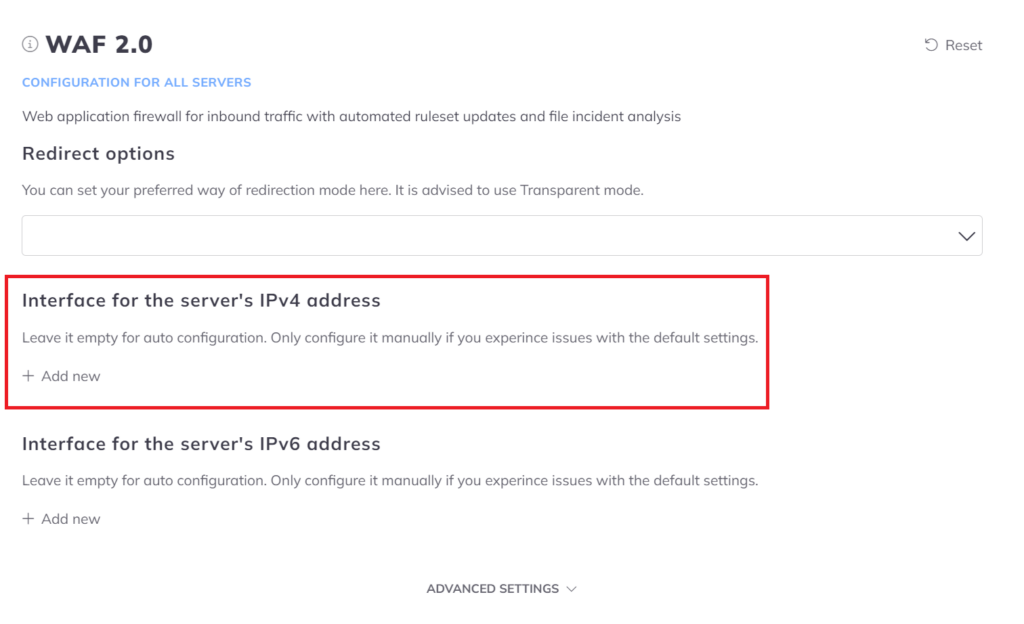
- Open the Configuration menu on your BitNinja dashboard.
- Select the setting level on the left side. (server-level, server group-level, account-level)
- Select the WAF 2.0 module on the left side.
- Under the "Interface for the server's IPv4 address" you have to click Add new
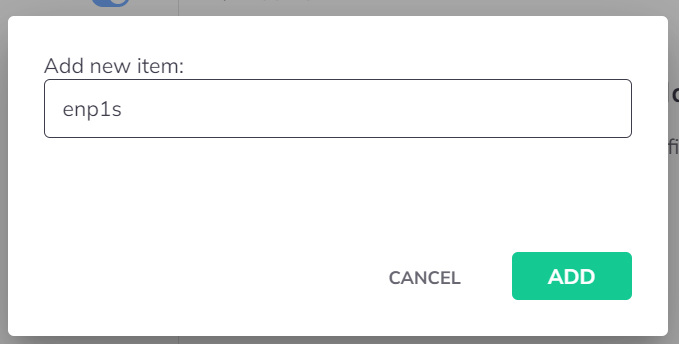
- You have to input the name of the interface.
For example, let's say the name of your private interface is enp1s then it has to look like in the picture below.
- After that is done you'll see a Save button on the top right corner, make sure to save this.
- The last step is to restart BitNinja with
service bitninja restartcommand.